Spanish nationality online tracking
A Complete Guide on Spanish Nationality Online Tracking
Are you wondering if you are eligible for Spanish nationality? Maybe you are planning to study or work in Spain and want to prove your citizenship. Or you are researching your family history and want to know more about your roots. Well, you can easily track your nationality status online. The Spanish government has implemented an online tracking system for obtaining nationality.
This system, often called cómo va lo mío, lets applicants check the status of their nationality by residence file online. The system is designed to improve the efficiency of the application process and to provide a better experience for applicants. It also allows the government to track application progress and identify potential issues or delays.
Continue reading this article to the end to learn everything you need to know on how to track Spanish nationality online, from how to navigate through the process to the different alternative ways to check the status of your nationality.
What is como va lo mío?
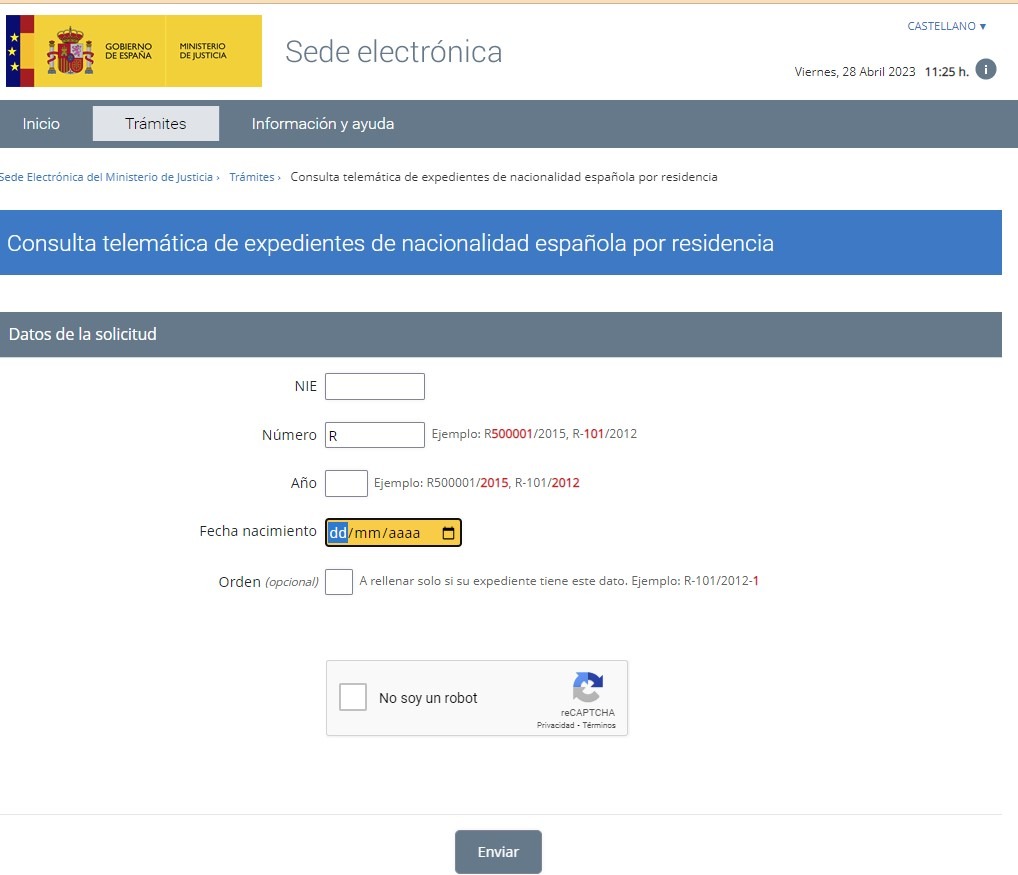
Officially, ¿Cómo va lo mío? is a service on the Ministry of Justice website that lists the applications you have in progress with the Ministry once you log in with Cl@ve, the Spanish government digital ID. People also use the name for the Consulta telemática de expedientes de nacionalidad española por residencia, which needs no Cl@ve and is the tool explained step by step below. Neither one covers residence or work permits. This platform is a special service that was created by the Ministry of Justice in Spain (MJUS) and shows the status of nationality files.
It is a status check and nothing more. You do not give an email or phone number, so it sends no notifications, and you cannot write to the Ministry through it. The platform has become essential for those navigating the often complex and time-consuming Spanish bureaucracy.
It is a status check and nothing more. You do not give an email or phone number, so it sends no notifications, and you cannot write to the Ministry through it. The platform has become essential for those navigating the often complex and time-consuming Spanish bureaucracy.
How use the platform to track the state of your nationality
Tracing the status of your nationality application online using como va lo mío is a simple and effective way to stay informed of the progress of your application. Below are the steps on how to use the platform to track the status of your citizenship application.
- Step 1: Get an R number: The first step you should take when you want to check your nationality file on the platform is to get an R number. The R number is the file number of your nationality by residence application, written like R123456/2024: the letter R, the file number and the year. Its good to note that, foreigners can apply for Spanish citizenship depending on years of residence in the country.There are two different ways you can get the R number. If you register your nationality online, you receive the R number automatically, But when you submit your nationality through a public or civil registry it may take even months for the R number to be assigned. It will be assigned after your nationality file is digitized. That is why it is advisable to make online application. Once you have the R number you can proceed to next step.
- Step 2: Access the platform: The next step is to access the platform and begin tracking the status of your nationality application. The form has four fields: NIE, file number (Número), year (Año) and date of birth (Fecha nacimiento). You will be required to fill the first box with your NIE number. After filling in that, the second box you will be required to fill has the letter R. Here, you will key in the identification number of the corresponding nationality file number, which is a six-digit number. Please note that your file number differs from the one assigned from the Civil Ministry but from the Ministry of Justice. The civil registration number will not be valid! Next, fill in the year, which is the one at the end of your file number (2015 in R500001/2015). Lastly, enter your date of birth, tick “No soy un robot” (I am not a robot) and press “Enviar” (Send). Here you will be able to see the status of your nationality application.
- Step 3: Check the Status of Your Application: Once you have entered all that data correctly, a new page will open, and now you can access the electronic headquarters of MJUS. This page contains all the data about this particular application at the moment; hence you will be able to see the status of your file. The status will indicate the stage your application is at in the processing, which includes “File request pending,” “Response from file request pending,” “in qualification,” “Being studied,” “Granted,” or “Archived,” and more. If your application is still “In process,” it means that the authorities are still reviewing it, and you will need to wait until they decide.
Does the Platform offer real time and official data?
Before using this online platform to view the status after applying for Spanish citizenship, there are several things you need to note about the information it displays.
Although the Spanish Ministry developed the platform to provide real-time and official information on the status of nationality by residence files. It’s worth noting that there may be some delay between updates to your application status and the information reflected on the platform. Therefore, the status of your file may be a step ahead of what is reading on the platform incase information is not updated.
Although the Spanish Ministry developed the platform to provide real-time and official information on the status of nationality by residence files. It’s worth noting that there may be some delay between updates to your application status and the information reflected on the platform. Therefore, the status of your file may be a step ahead of what is reading on the platform incase information is not updated.
Moreover, the status you receive after filling in your data is not official, and printing or screen shooting the image cannot be used to validate any legal process. However, you must wait for official communication if the nationality has been granted or is in whichever stage from the Ministry.
Therefore, if you are using como va lo mío, it is advisable to visit the website periodically to check for any changes.
Therefore, if you are using como va lo mío, it is advisable to visit the website periodically to check for any changes.
Are there other alternative ways of checking the Status of your Spanish nationality?
Yes. There are several alternative ways you can use if you want to track the status of your nationality file including
#1. Contact the Ministry of Justice
You can contact the Ministry directly to inquire about the status of your nationality application. You can do this by a contact form, phone, or email, or by visiting the nearest office in person.
To find out your nationality status using a contact form, you can visit the Ministry’s official website. Look for the contact form on the website, and provide your personal information and nationality file number when submitting your inquiry.
It’s vital to provide accurate and complete information to ensure the administrative authority can locate your application and provide an accurate status update. Once you submit your inquiry, you may need to wait for a response from the administrative authority, which may take several days or weeks, depending on their workload and processing times.
If you don’t receive a response or are not satisfied with the response provided, you can follow up with a phone call or email to the administrative authority for further clarification.
If you opt to contact the Ministry directly, call 902 007 214 or 91 837 22 95. Neither number is free: on a 902 line the caller pays the whole call, so the 91 number is usually cheaper, and from outside Spain you dial it as +34 91 837 22 95.
When you call, be prepared to provide your identification information and application reference number if requested.
#2. Check via “Carpeta Ciudadana”
Another way you can fast track the status of your Spanish citizenship by residence is through a platform called Carpeta Ciudadana. This website shows all your active files with the Spanish public administration. To view the file status, you need to follow these steps:
- Go to the Carpeta Ciudadana website: Visit the website at https://carpetaciudadana.gob.es/carpeta/clave.htm citar and click on the option “Acceder” (Access Citizen Folder).
- Log in: you use Cl@ve, a digital certificate or your electronic DNI.
- Select the nationality application: Look for the section related to nationality and select the application you want to view the status.
- Check Spanish nationality status: Once you have selected the application, you will be able to check the status of your application, including whether it is pending, being processed, or has been approved.
It’s important to note that you can only log in with Cl@ve (Cl@ve PIN or Cl@ve Permanente), a digital certificate or an electronic DNI. If you have none of these, you may need to use alternative methods to view the status of your nationality application.
#3. Personal Visit
You may also visit the headquarters of the ministry in person to inquire about the status after you apply for Citizenship in Spain. The office is located in C/Bolsa number 8 in Madrid, the capital city of Spain. Before visiting the Headquarters, it is advisable you contact them to confirm their office hours, the documents you need to bring, and any other information or requirements that you may need to know. Besides, you will need to make an appointment before visiting the office.
However, it is good to note that you cannot go and inquire in person on the civil registry.
#4. Ask our lawyers
Our lawyers can track your nationality file for you and tell you when anything changes.
Why track your Spain Nationality online?
Using a Spain nationality online tracking, such as the “cómo va lo mío” platform, can be beneficial in several ways. First and foremost, it allows you to view the status of nationality your application from anywhere with an internet connection, at any time, without the need to visit a physical office or make phone calls.
The platform provides reliable information on the progress of your application, which can be reassuring and provide peace of mind. It can also help you stay informed about requests for additional documentation or any issues that may arise during the review process.
In addition, online tracking can save time and effort, eliminating the need to physically go to the relevant administrative authority or make phone calls. It also allows you to check your application status at your convenience, which can be particularly useful if you have a busy schedule.
Final Words about spanish nationality tracking online
In conclusion, tracking the status of your nationality in Spain can be a straightforward process if you know where to look and how to access the relevant information. The most common and effective ways to check your nationality status include using the official online platform “Como va lo mío”, contacting the Ministry’s General Information Service by phone, visiting the Ministry headquarters in person, or asking our lawyers to follow it for you.
It’s important to keep in mind that processing times for your nationality application can vary depending on various factors, such as the volume of applications, completeness of documentation, and complexity of individual cases. Therefore, it’s always best to follow up regularly and ask our lawyers if you have any concerns or questions about your application.
By staying informed and using the right channels to track your nationality status, you can ensure that you are up-to-date on the progress of your application and take any necessary steps to expedite the process or address any issues that may arise.
I am waiting for the answer to obtain the Spanish nationality, but I have been waiting for months… can you help me?
Can you send us proof of submission of your application for Spanish nationality? This way we can check if it is submitted or not… as explained in the posts you can see the online status of your Spanish nationality application.